Abandoned carts and recovery
Updated 2026-09-01
How Botragon records the shoppers who left without paying, what the reminders would say, and why — today — no reminder is actually sent.
What does abandoned cart recovery do?
A shopper fills a basket in your Salla store, reaches the payment step, and closes the tab. Botragon records that cart. On the Recovery screen you see how many carts were left behind, how many reminders the system planned for them, and how much money came back.
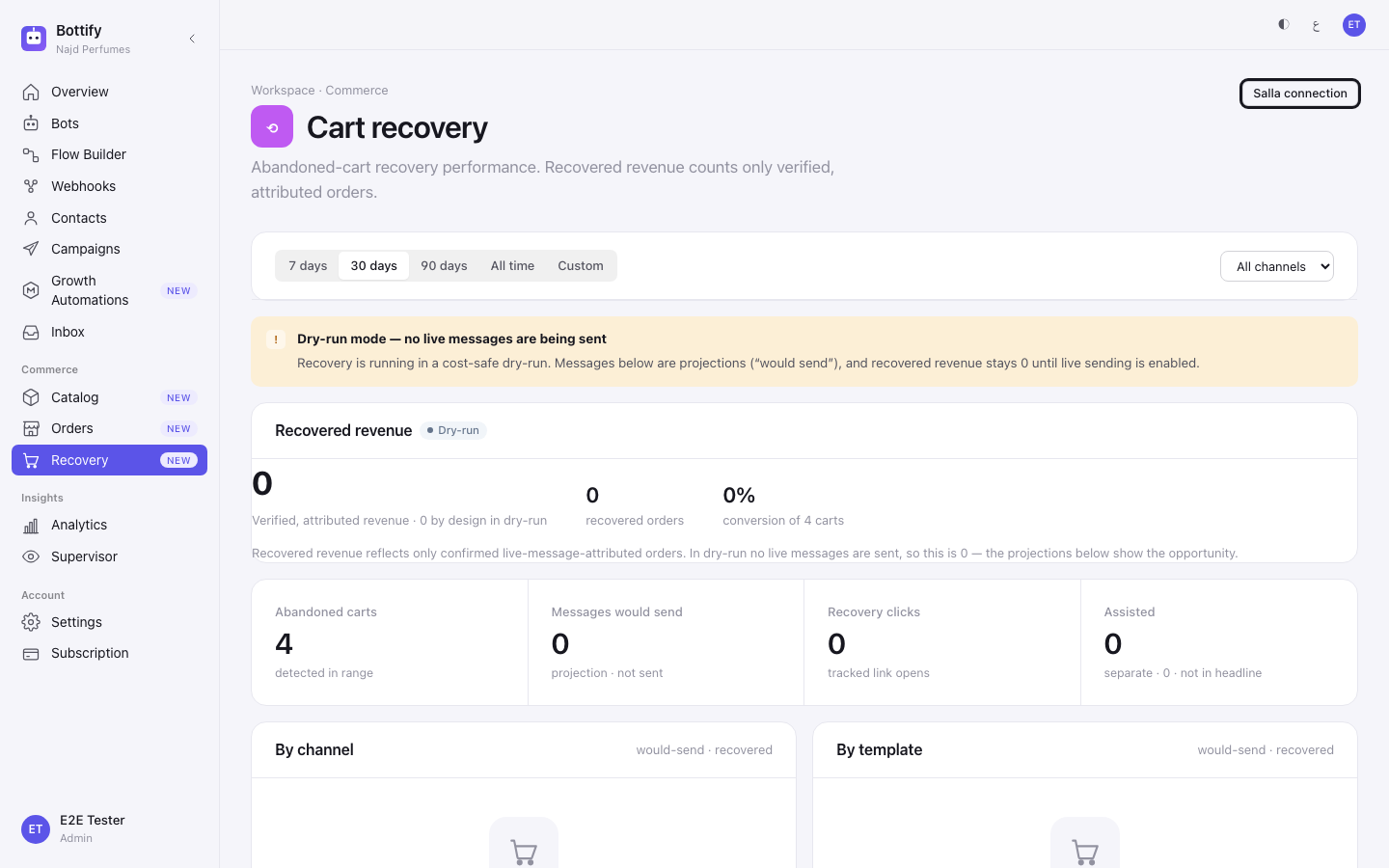
Read this before anything else: reminders are planned, not sent. Botragon is running cart recovery in a cost-safe rehearsal. Every reminder that comes due is written down and counted, and no message leaves the system. The screen tells you so in its own words — "Dry-run mode — no live messages are being sent" — and the recovered-revenue figure is marked "Verified, attributed revenue · 0 by design in dry-run". That 0 is a design decision, not a poor result.
Nouf runs Najd Perfumes, a small shop in Riyadh selling on Salla. A customer adds Oud Mubakhkhar 50 g and a 3 ml bottle of Royal Oud oil — SAR 640 — gets to checkout, and disappears. Salla tells Botragon the cart was abandoned. One hour later the reminder for that cart comes due, and Botragon writes down what it would have said. Nouf opens Recovery and reads: Abandoned carts 1, Messages would send 1, Recovered revenue 0.
That is the honest shape of the feature right now. What Nouf gets from it is the size of the leak and a system that is ready on the day sending is switched on.
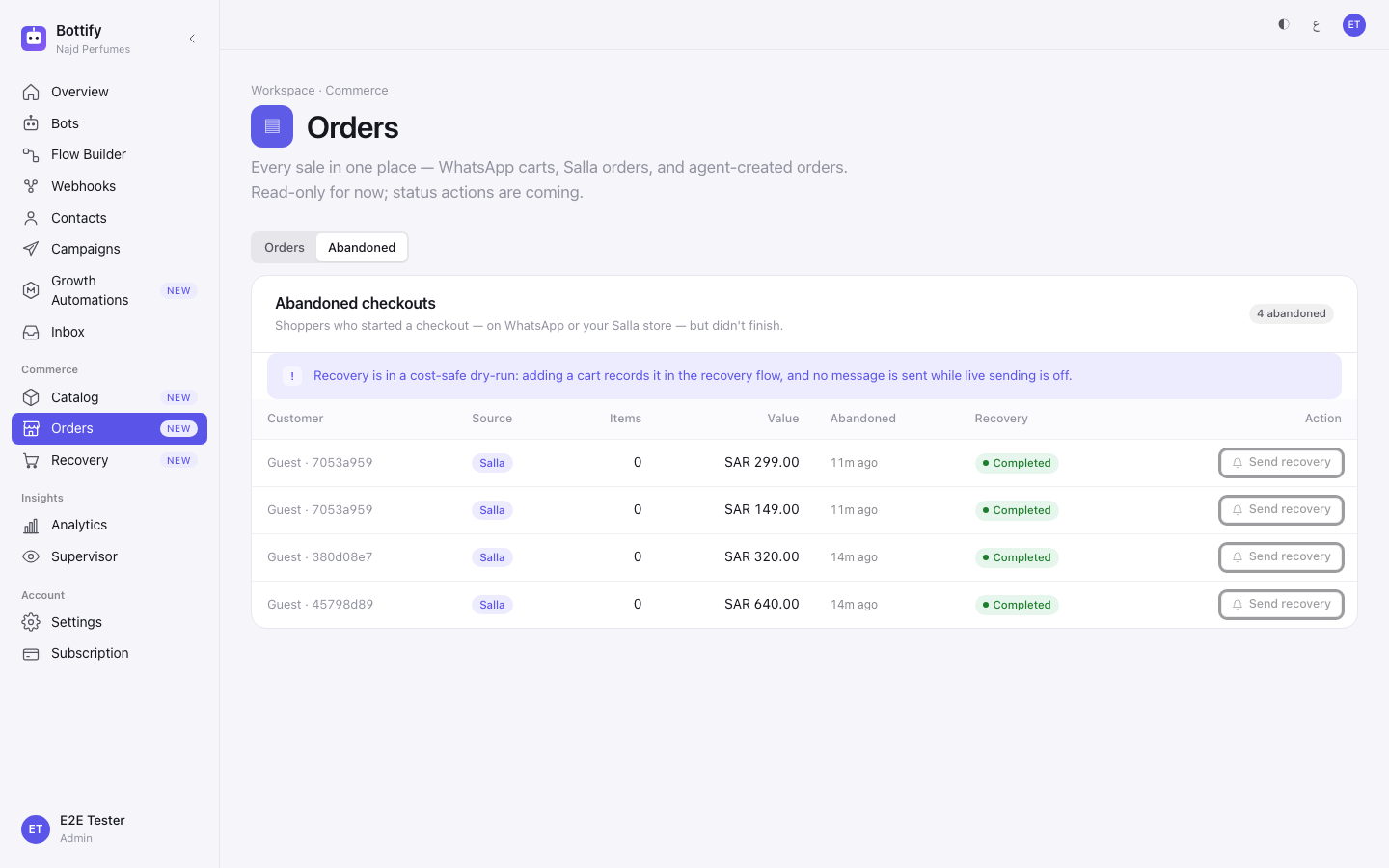
One naming point, so two screens don't read as two features: the Abandoned tab under Orders is titled Abandoned checkouts, and the carts counted on the Recovery report are the same rows. Same shoppers, two words for it.
What do you need before cart recovery works?
| # | What must be true | Where you check it |
|---|---|---|
| 1 | Your plan includes Salla. | If it doesn't, Recovery shows a full-page card instead of the report. |
| 2 | Your Salla store is connected — Connecting your Salla store. Open Settings → Salla store and look for the status Connected. If it says otherwise, press Connect to Salla. | /settings/salla |
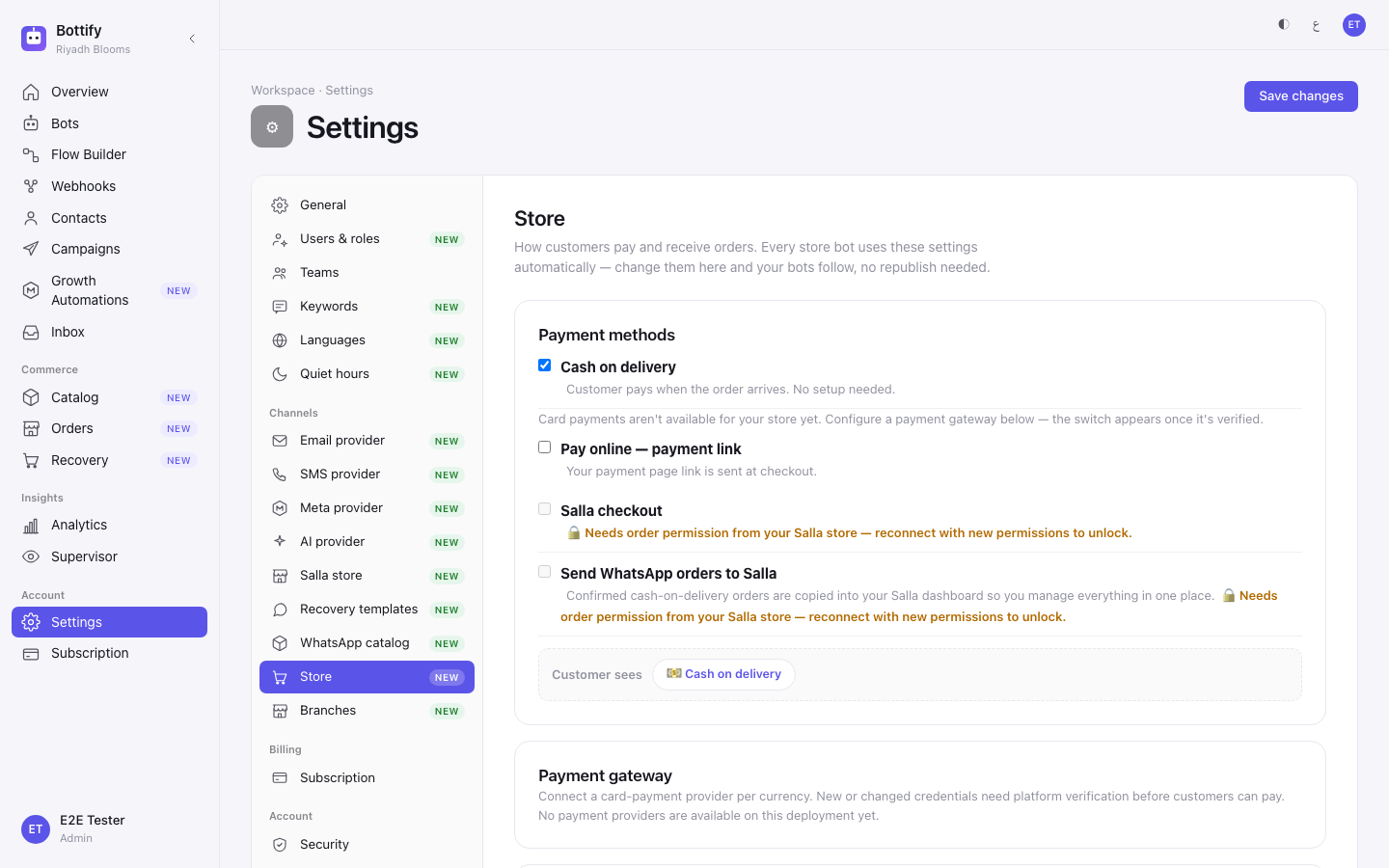
| 3 | Botragon has switched cart recovery on for your workspace. This is not something you can do — Botragon enables it per account. Until it is enabled, the switch in Store settings does not exist. | /settings/store |
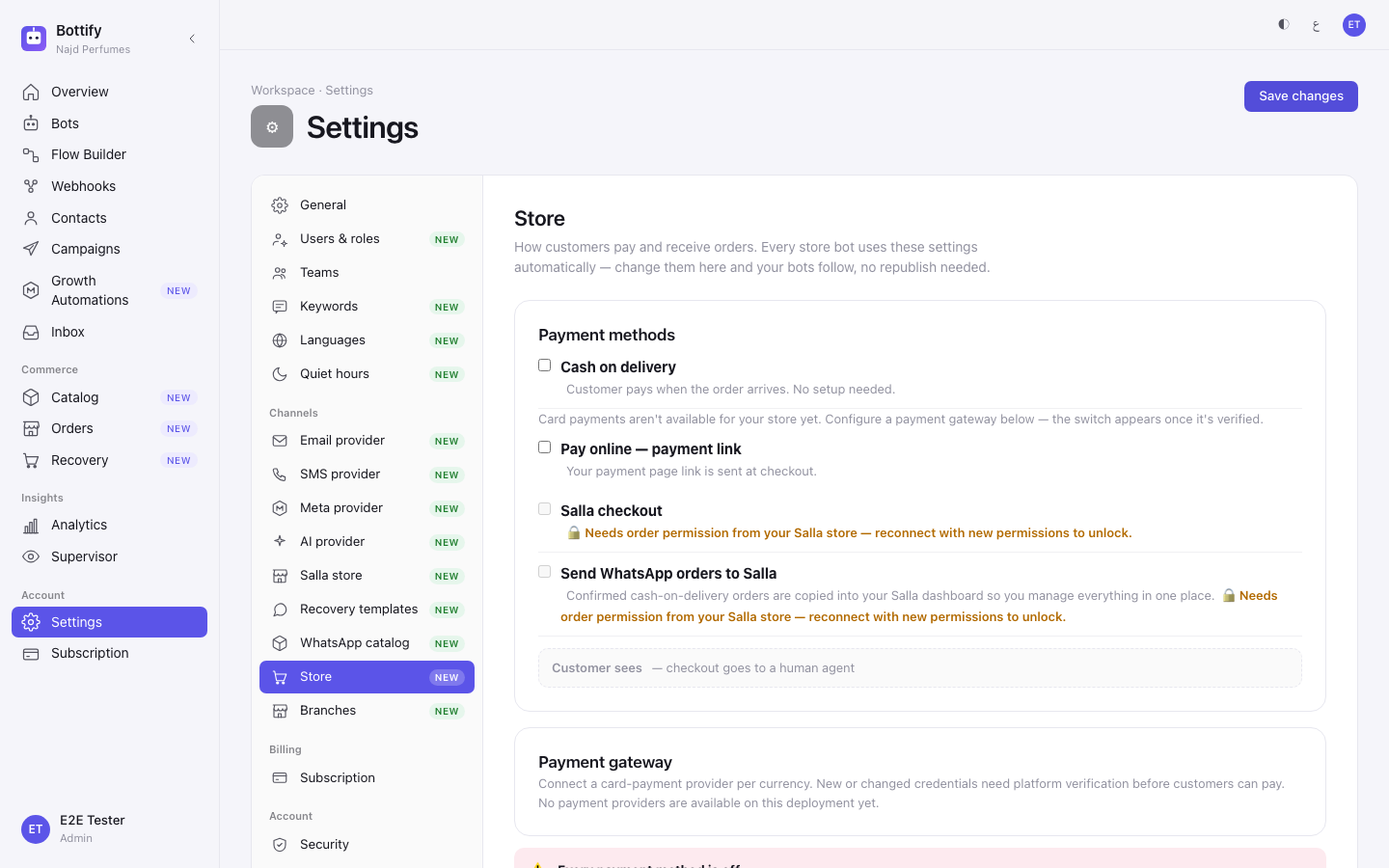
| 4 | You have turned cart recovery on yourself. It is off for every new store. | /settings/store |
| 5 | You are an admin. Only admins can change the cart-recovery switch or touch recovery templates. Admins, supervisors and agents can read the Recovery report and the Abandoned tab; viewers cannot. | — |
Points 3 and 4 are two different switches and people confuse them constantly. Botragon enabling recovery makes the feature available to you. Only your own switch makes it active.
And three separate things still stand between a planned reminder and a customer's phone:
- Meta has not yet approved Botragon. WhatsApp, Instagram and Messenger cannot be connected through Botragon's own path today — the onboarding checklist says exactly that: "WhatsApp, Instagram and Messenger — awaiting platform approval". You can still connect by bringing your own Meta app.
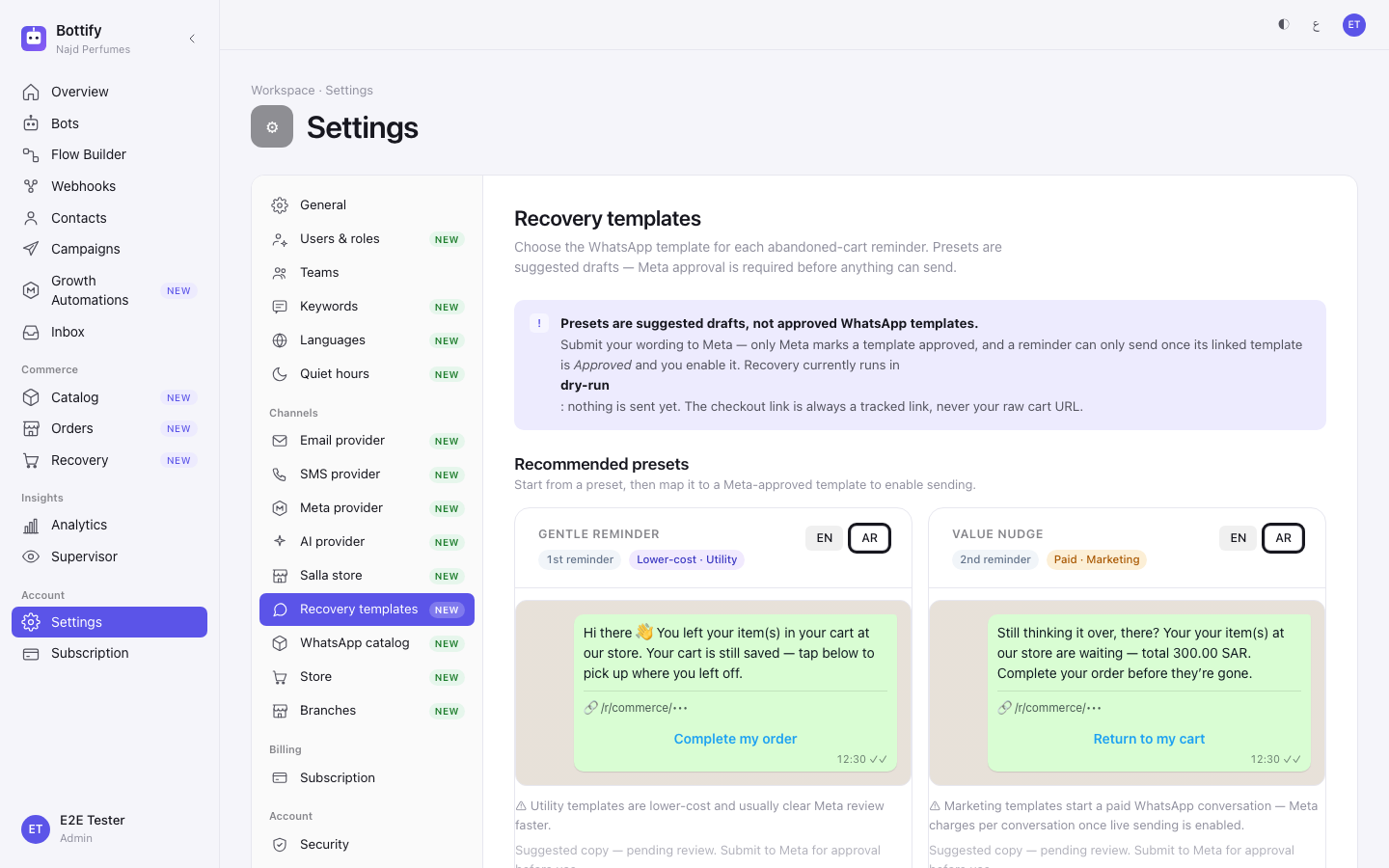
- Each reminder step needs its own WhatsApp template, approved by Meta. Only Meta marks a template approved — nothing in Botragon can.
- Live sending is off across the platform. Even with your own Meta app and an approved template, nothing sends until that changes.
No screen tells you when that will happen. The product's own answer, on the Recovery gate card, is to contact your administrator.
What are your options for cart recovery?
| Option | Where | What changes if you turn it on | What changes if you leave it off |
|---|---|---|---|
| Cart recovery reminders (the switch) | Settings → Store, Cart recovery card | Carts abandoned for more than an hour are enrolled into a recovery campaign, and each due reminder is written down and counted. Your Messages would send figure starts moving. | No reminders are planned. Carts are still recorded — the Abandoned tab keeps filling either way. Off means "no reminders", not "stop watching". |
| Which preset you apply | Settings → Recovery templates | Gentle reminder is a Utility template: "Lower-cost · Utility", and Meta usually reviews these faster. Value nudge and Discount incentive are Marketing: "Paid · Marketing", and the screen warns that these "start a paid WhatsApp conversation — Meta charges per conversation once live sending is enabled." | No reminder step is configured, and the screen reads "No reminder steps configured yet. Apply a preset above to create a draft." |
| Removing a step | Recovery templates → Remove | That step has no template behind it any more. You can apply a preset again at any time. | The step keeps its draft. |
| Date range | Recovery, top of the page | 7 days / 30 days / 90 days / All time / Custom change every figure on the page. The page opens on 30 days. | — |
| Channel filter | Recovery, top of the page | All channels / WhatsApp / Email narrows the headline figures and the would-send count. It does not narrow the By channel and By template tables underneath — those always cover every channel for the date range. No label on the screen says this. | — |
Things you cannot change: the first reminder comes due an hour after the cart is detected, a cart gets at most 2 reminders, and there must be at least 24 hours between them. There is no setting for any of that.
How do you set up abandoned cart recovery?
Turn recovery on and read the report — you must be an admin.
- In the sidebar, open Settings, then Salla store, and confirm the status reads Connected.
- In the settings list on the left, open Store.
- Scroll to the Cart recovery card.
- Turn on Cart recovery reminders.
- Press Save changes.
- In the settings list, open Recovery templates.
- Under Recommended presets, find Gentle reminder and press Apply preset on that card.
- In the sidebar, under Commerce, open Recovery.
- Read the banner at the top of the page before you read any number below it.
Chase one specific cart — admins, supervisors and agents.
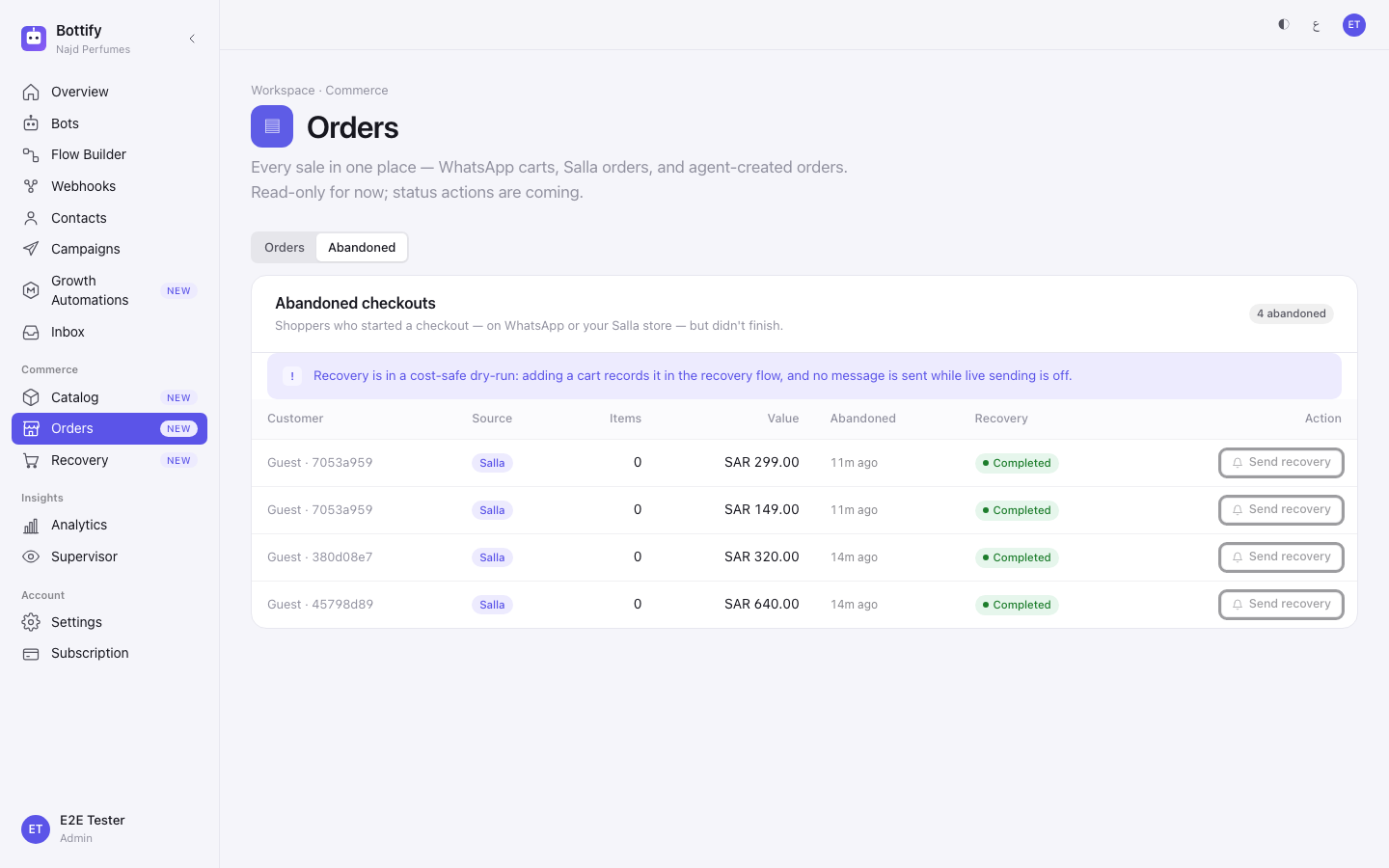
- In the sidebar, under Commerce, open Orders.
- Switch the view to Abandoned.
- Read the notice at the top of the list.
- On a row whose source is your Salla store, press Send recovery — despite the label, this records the cart in the recovery flow and no message goes out.
Most rows will not carry a customer name. Salla hands over carts without contact details, so the customer column reads Guest with a short reference, or Unknown shopper.
How do you know a cart was recovered?
After step 5, a toast: "Store settings saved".
After step 7, a toast titled "Draft created", with the body "Gentle reminder added as a disabled draft at the 1st reminder. Map it to an approved template to enable it." Under Configured reminders, the new step appears marked "Draft — not mapped" and "Not sending", with the suffix "· Disabled (cost-safe)". Applying a preset creates a draft inside Botragon. It does not create anything at Meta, and it does not enable sending. The order is: apply a preset → you have a draft in Botragon → you submit the wording to Meta → Meta approves it → you enable the step.
On the Recovery page, the banner reads "Dry-run mode — no live messages are being sent", and under it: "Recovery is running in a cost-safe dry-run. Messages below are projections ("would send"), and recovered revenue stays 0 until live sending is enabled." The headline is Recovered revenue with a Dry-run chip beside it. Below, Abandoned carts with the note detected in range, and Messages would send with the note projection · not sent. On Nouf's page, that reads 1 and 1.
That second number is the one that means the plumbing works. A cart was detected, a reminder came due, and it was counted.
After pressing Send recovery, a toast titled "Recovery queued (dry-run)", with the body "Recorded and queued through the recovery flow — no message was actually sent while sending is off." The row's Recovery column changes to Queued.
One figure you will meet and should not misread: Assisted, tagged separate · not in headline. Those are orders matched to an abandoned cart where no reminder was involved — the customer came back on their own. Botragon keeps that number apart from recovered revenue on purpose. Never add the two together.
Why is no recovery reminder being sent?
The Cart recovery switch isn't there
What you see — in Settings → Store, where the switch should be: "Cart recovery isn't available for your store yet. Once it's enabled for your account, the switch will appear here."
Why — Botragon has not switched cart recovery on for your workspace. This is the first thing that stops most stores, and it is not a fault in your setup. Botragon would rather show you an honest note than a switch that does nothing.
What to do — nothing you can do in the product. Ask Botragon to enable cart recovery for your account. Until then the onboarding checklist step for cart recovery will stay unticked; it is optional and does not block the rest of your setup.
"Recovery not available" after pressing Send recovery
What you see — a toast titled "Recovery not available", with the body "Cart recovery is switched off in your store settings. Turn it on there first."
Why — the cart is fine and your plan is fine; your own switch is off. Carts are recorded whether or not the switch is on, so a full Abandoned tab is not proof that recovery is running.
What to do — go to Settings → Store, turn on Cart recovery reminders, press Save changes, then come back and try the row again.
The row's button is greyed out
What you see — the Recovery column reads "Not available yet" and the action button does not respond. Hovering it shows "Recovery for this source is coming soon". If a request does reach the server, the message is "Recovery for WhatsApp carts isn't available yet — it's coming in a later update."
Why — the cart was started in a WhatsApp conversation, not in your Salla store. Only Salla checkouts can be enrolled in recovery today. The tab's own description mentions both sources, which makes this a fair thing to try — and it will refuse.
What to do — nothing for that cart. Check the Source column and work the Salla rows.
One more, because it is easy to mistake for a polite refusal. If you see "Something went wrong on the store's side. Try again in a moment, and tell someone if it keeps happening.", that sentence means what it says. This is the one failure on this screen worth retrying, and the one worth reporting if it repeats.